How to Load Your Personal Context into Claude and Cursor via MCP
Connect Unabyss over HTTP MCP so agents call whoami and query before you re-introduce yourself


Every AI session starts from zero. You've told Claude your role, your company, what you're building - and next session, it's gone. You tell Cursor the same thing. Then your AI writing tool. You spend more time re-introducing yourself than actually working.
MCP makes this fixable. Unabyss runs a streamable HTTP MCP server at https://mcp.unabyss.com/. Compatible hosts connect with a bearer token (or OAuth where supported). The model then calls Unabyss tools - whoami, query, store, and others - to read and update your context instead of relying on chat memory alone.
This guide matches how the Unabyss client app wires MCP today. For host-specific screenshots and copy-paste snippets, use the in-app guide at app.unabyss.com/mcp/guides.
Part 1: How personal context shows up over MCP
Unabyss is not a bundle of static MCP resources named identity or profile. The server speaks MCP 2025-06-18 with tools and an optional prompt (load_user_context) that nudges the host to load context early.
What agents actually use:
whoami- persisted identity summary (cheap baseline read at session start)query- fast lookup when the user refers to themselves, their work, or preferencesstore- write durable facts back into the knowledge baselist_integrations/propose_connection- see connected sources and offer one-click connectsexport_list,export_read,export_create_from_text, and related export tools - prebuilt context bundlesagentic_query/agentic_query_read- deeper synthesis when a simple query is not enoughupdate_identity- propose identity summary changes (requires explicit user confirmation in the tool flow)
Your vault still has product layers (identity, profile, mind, exports, and so on) under the hood. MCP exposes them through these tools and permission filters, not as separate resource URIs.
How this differs from the MCP memory server: that server records what an AI learns from conversations over time. Unabyss context is extracted from your sources up front and kept in a vault you control. Memory is reactive; context is intentional.
Part 2: Connect in the Unabyss app
Step 1: Build your context
Connect sources in the Unabyss app - LinkedIn at minimum; add Gmail, Notion, GitHub, or others for richer context. Unabyss extracts and structures your vault in under 90 seconds.
Step 2: Open MCP in the app
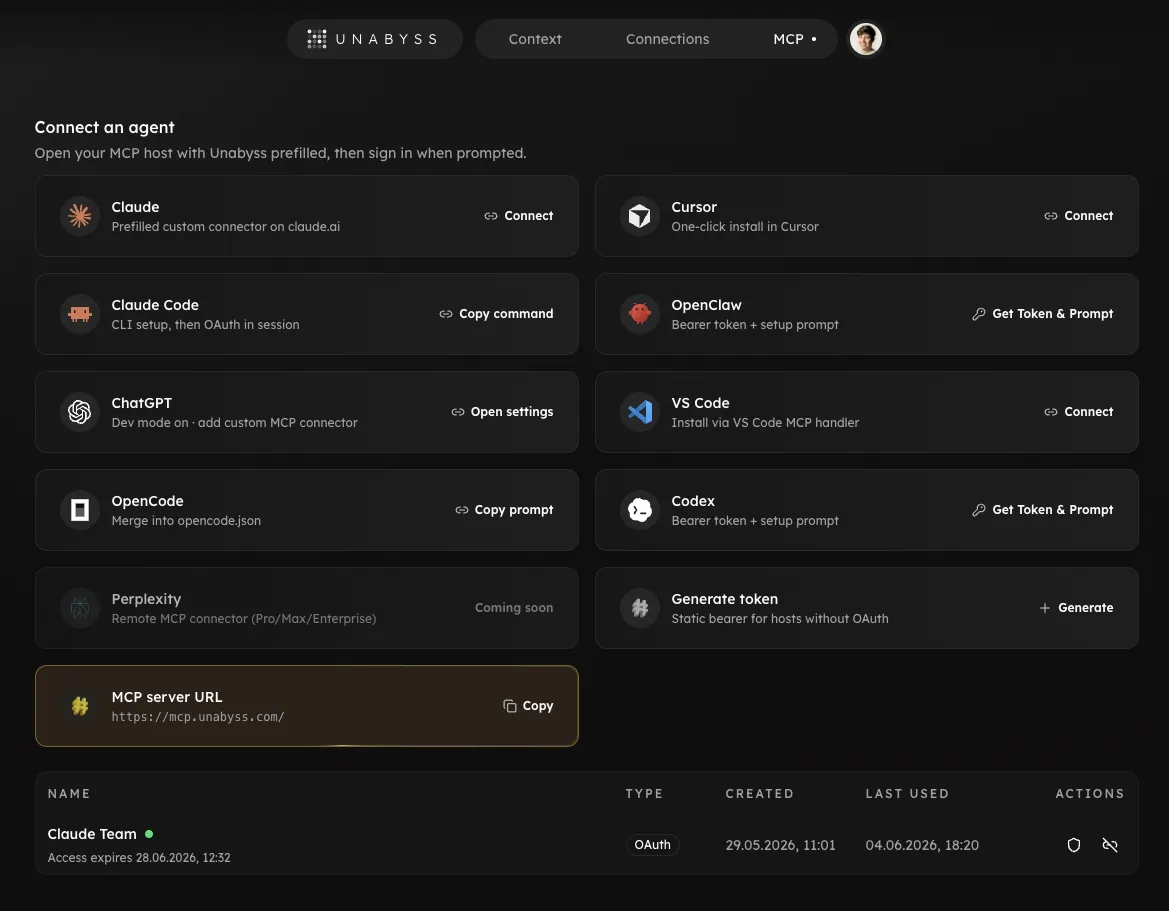
Go to app.unabyss.com/mcp. You will see:
- The MCP server URL (
https://mcp.unabyss.com/) to copy into any host - Connect cards for Cursor, Claude, VS Code, ChatGPT, and other agents (one-click or copy-paste flows)
- Generate token for hosts that need a static bearer
Pick OAuth / one-click where the card offers it. For a manual host, generate a named static token. The plaintext token is shown once; store it in your password manager. Revoke or edit permissions anytime from the token table on the same page.
Static tokens use the unby_mcp_… prefix. OAuth connections use the standard Unabyss OAuth flow on the MCP host (no long-lived token pasted into a config file).
Step 3: HTTP config (most hosts)
Hosts that accept remote HTTP MCP use the same shape the app copies into guides - URL plus Authorization: Bearer <token>:
{
  "mcpServers": {
    "unabyss": {
      "url": "https://mcp.unabyss.com/",
      "headers": {
        "Authorization": "Bearer your-token-here"
      }
    }
  }
}
Replace your-token-here with the token from Generate token, or use the host's OAuth flow when available (Claude Code sessions often OAuth instead of pasting a bearer).
Part 3: Claude and Cursor
Cursor
Fastest: on app.unabyss.com/mcp, click Connect on the Cursor card (one-click install deeplink).
Manual: Cursor → Settings → Tools & MCP → add a server, or edit ~/.cursor/mcp.json and merge the unabyss block from the JSON above.
Verify: ask "What MCP tools are available?" - you should see Unabyss tools such as query and store.
Claude Desktop
Claude Desktop does not talk to https://mcp.unabyss.com/ directly in all setups. The supported path in the app is a small mcp-remote bridge (Node.js 18+):
- Claude Desktop → Settings → Developer → Edit Config (or open
claude_desktop_config.jsonunder~/Library/Application Support/Claude/on macOS,%APPDATA%\Claude\on Windows,~/.config/Claude/on Linux). - Merge an
mcpServers.unabyssentry that runsnpx mcp-remote@latestagainsthttps://mcp.unabyss.com/withAuthorization: Bearer …(see the exact snippet on app.unabyss.com/mcp/guides). - Fully quit and relaunch Claude Desktop, then confirm Unabyss appears under tools.
For Claude on the web, use Connect on the Claude card at app.unabyss.com/mcp — it opens the official Unabyss connector in Claude's directory, so there is no custom-connector form and no URL to paste. Added there, the connector lands on your Anthropic account and works in Claude Desktop and the mobile apps too.
Claude Code
From the app MCP page or your terminal:
claude mcp add --transport http unabyss https://mcp.unabyss.com/ \
  --header "Authorization: Bearer your-token-here"
Many teams prefer OAuth in Claude Code instead of a static bearer; follow the host's OAuth prompt after adding the server.
Paste the companion agent instructions from app.unabyss.com/mcp/guides?app=claude-code into CLAUDE.md so the CLI knows to call whoami early and store when it learns durable facts.
Other hosts
- VS Code - one-click
vscode:mcp/installfrom the app grid (HTTP, same URL) - ChatGPT - one click from the app grid; it opens the official Unabyss plugin, nothing to paste
- Perplexity - add a custom connector in the host's settings; URL
https://mcp.unabyss.com/, auth Bearer, token from Generate token - Codex / OpenClaw - use Get Token & Prompt on the app MCP page for TOML or JSON with
Authorization: Bearer … - OpenCode - HTTP block with
Authorization: Bearer {env:UNABYSS_TOKEN}(env var name documented in the in-app OpenCode guide)
Part 4: What each connection can see
Permissions are set when you generate or edit a token on app.unabyss.com/mcp, not as Identity/Profile/Mind toggles:
- Hide private info - filters personal, financial, and DM-class content from MCP responses
- Hide company confidential - filters internal strategy, unreleased product, and similar content
- Exclude specific apps - drop memories sourced from chosen integrations (deterministic, no LLM in the loop)
OAuth connections use the same permission model on the consent screen. Filtered reads may consume credits; unfiltered whoami is designed to be cheap for baseline context.
Set it up once
Connect once per host. After that, instruct the agent to call whoami at the start of a session and query whenever the answer depends on who you are - the patterns in the in-app host guides exist so you do not have to repeat your biography in every chat.
The context stays in your vault. MCP is how external tools reach it safely.